
Your Clients. Their Plans. One Place.
Financial planning, embedded in the connected operating system where you already work
Advisor360° Planning, powered by Conquest Planning, seamlessly integrates financial planning into your advisor workday, creating a more connected and engaging client experience. No separate login. No duplicate data entry. No lost context between planning and execution.

The Advisor Desktop is where every part of the advisor experience comes together.
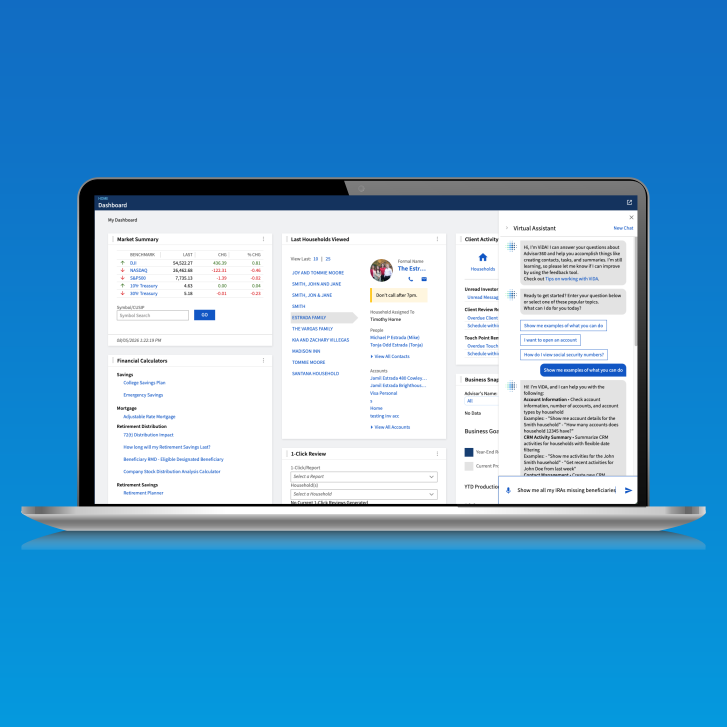
Advisor360° Advisor Desktop is the central workspace of the Autonomous Financial PlatformTM. Every tool, every client record, every workflow, and every insight accessible from a single pane of glass. Intuitive navigation puts your full practice within reach. ViDA®, your embedded AI assistant, is there when you need answers. And the practice-level dashboard surfaces what matters most so you can take action.
The Challenge
Most advisor platforms give you tools. None of them give you a connected workday.
The problem with point solutions is not that any individual tool is bad. The problem is that every tool has its own interface, its own navigation, and its own version of your client data. Advisors spend more time orienting themselves across systems than they spend acting on what those systems tell them. The workday becomes a series of context switches and logins, not a continuous flow of work.
We built the Advisor Desktop because the platform should be one connected experience. When every capability is accessible from the same workspace, built on the same data, the advisor workday runs the way it should.
Benefits
One workspace. Always in context.
Your practice, configured the way you work.
The Advisor Desktop is not a fixed layout handed to you by a vendor. It is a configurable workspace that reflects how you run your practice. Surface the data and workflows that matter most to you, organized the way you think about your business.
Your AI assistant, already on the platform.
ViDA is embedded directly into the Advisor Desktop. Ask questions, surface insights, take action. Intelligence woven into the workday, not bolted on as a separate tool.
Your full practice, one search away.
Global search and Notifications Center puts every client, every account, every document, and every workflow within reach from anywhere in the platform. No navigating back to a home screen. No switching systems to find what you need.
What you get
The Advisor Experience, unified in one workspace.
Intuitive Navigation
Every capability on the Advisor360° platform is accessible from a single, logically organized workspace. Go from practice level reporting to a household holdings view in seconds. Get a view of your calendar and run the reports needed for an upcoming meeting in one click.
ViDA, Your AI Assistant
ViDA is the AI assistant embedded directly into the Advisor Desktop. Ask questions about clients, accounts, or practice data and get answers in context, without leaving your workflow. ViDA will even teach you how to use the platform to the fullest potential.
Global Search
Search across the entire platform from anywhere. Clients, accounts, documents, cases, and workflows surfaced instantly from a single search bar. No system switching required.
Practice-Level Configurable Dashboard
A customizable home base that surfaces the practice data most relevant to your role and workflow. Widgets, views, and data points across your CRM, workflows, business goals, market data all configurable to how you run your business.
Notification Center
A centralized hub for alerts, updates, and action items across the platform. View money movement and trading updates or client activity and account management updates, and with one click you can take action.
For Firm Leaders
The desktop is the first thing every advisor sees. Make it work for them.
When the advisor workspace is well-designed, productivity follows. When it is fragmented, tools create friction. The Advisor360° Advisor Desktop gives firms a consistent, configurable foundation that every advisor on the platform works from, with the intelligence of ViDA built in and the flexibility to adapt to different practice models and workflows.
-
Give every advisor on your platform a single, consistent workspace that connects every capability without context switching.
-
Reduce onboarding time with an intuitive navigation model that new advisors can learn quickly and with ViDA there to answer any “How to” inquiry the advisors may have.
-
Surface firm-level data and notifications within the same desktop environment that advisors use for client work.
-
Embed AI assistance directly into the advisor workday, without requiring advisors to adopt a separate tool.
Your practice deserves a workspace that works the way you do. One place, every capability, always in context.
Frequently asked questions
-
What is ViDA?
ViDA® is Advisor360°'s platform AI. It brings assistants and agents together across the advisor workday, not as a replacement for advisor judgment, but as support for the work that gets in the way of it.
-
Can the Advisor Desktop be configured by practice?
Yes. The practice-level configurable dashboard allows advisors to surface the data and workflows most relevant to their role and practice model.
-
How does global search work?
Global search indexes clients, accounts, documents, cases, and workflows across the entire platform, making everything accessible from a single search bar from any location in the desktop.
-
What does the notification center cover?
The notification center surfaces alerts, updates, and action items from across the platform in one place, so advisors stay on top of what needs attention without monitoring multiple tools.